Hosting A Published Site
A published site is a folder of plain files: HTML pages, a stylesheet, a search script, a search index and the images the pages use. Because the site is already built, the files go online as they are, with no build step. EtherPK does not host sites. You pick a host and use your own account with it.
There are two ways to get the site to a host:
- Publish into a folder or download a zip, then push the folder to a git repository or upload it. Publishing into a folder works in Chrome or Edge on a computer and in Chrome on Android, and a zip download works in any browser.
- Let EtherPK commit the site to a branch of a GitHub repository, and a host that watches the branch deploys each commit. This method works in every browser, including on a phone, and needs no folder or git on your device.
When you publish into the same folder or branch again, EtherPK rewrites those of its own files that have changed and deletes the ones it no longer writes. It leaves every other file alone, so your git history, a CNAME file and robots.txt survive each publish.
To update the site after the first deploy, edit your notes, publish into the same folder, and push or upload it again. When EtherPK commits to a GitHub repository for you, you only publish, and the host deploys the commit.
Each published document becomes a page at the top level of the folder. Because pages link to each other by relative address, you can serve the site at the root of a domain or under a subfolder, or open it straight from disk.
Before you begin
- A publication with documents marked public, either published into a folder or a zip or ready to publish to a GitHub repository. See Publishing Your Notes As A Website for more information.
- An account with the host.
- The address the host gives the site, entered in Site address on the publication in Settings > Publish. EtherPK writes the sitemap and the feed only when the publication has an address, so publish again after you enter it.
To preview the site, open index.html in a browser. Pages, navigation and search all work from disk, so you can find problems before the site goes online.
GitHub Pages
The site folder has a GitHub Actions workflow, Deploy to GitHub Pages, that deploys each push to main. Push the site to a branch named main, or change the workflow.
-
Make the folder a git repository and push it to GitHub:
cd ~/Sites/garden git init -b main git add -A git commit -m "Publish the site" git remote add origin git@github.com:you/garden-site.git git push -u origin main -
In the repository on GitHub, go to Settings > Pages.
-
Under Build and deployment, set Source to GitHub Actions.
-
Push again, or select Run workflow on the Actions tab.
After each publish, commit and push the folder again:
git add -A && git commit -m "Update" && git push
When EtherPK commits to the repository itself, it writes no workflow. A workflow already in the repository stays, like any other file EtherPK does not write, and keeps deploying each commit. To serve a repository with no workflow, set Source to Deploy from a branch, choose the branch and / (root), and select Save.
To use your own domain, such as garden.example.com, enter it in Custom domain under Settings > Pages and select Save. Then, at your DNS provider, add a CNAME record that points the domain to you.github.io. A site that the workflow deploys does not need a CNAME file.
Publish to a GitHub repository
EtherPK commits the site with a token that you create on GitHub. GitHub refuses a commit that adds a workflow file unless the token can also change workflows, so EtherPK writes no workflow into the repository and the token needs only Contents.
Any code running in EtherPK's browser tab, extensions included, can read the token. Limit the token to the repositories you publish to and to Contents.
To create the token:
- On GitHub, go to Settings > Developer settings > Fine-grained tokens and select Generate new token.
- Give the token a name and an expiry date.
- In Resource owner, choose the account or organisation that owns the repository.
- In Repository access, select Only select repositories and choose the repositories you publish to.
- In Permissions, on the Repositories tab, select Add permissions and tick Contents.
- Set Contents to Read and write. GitHub adds Metadata as read-only. Add nothing else.
- Generate the token and copy it.
To publish to the repository:
-
In Settings > Publish, under Publish to on the publication, select A GitHub repository. The GitHub section appears at the top of the tab.
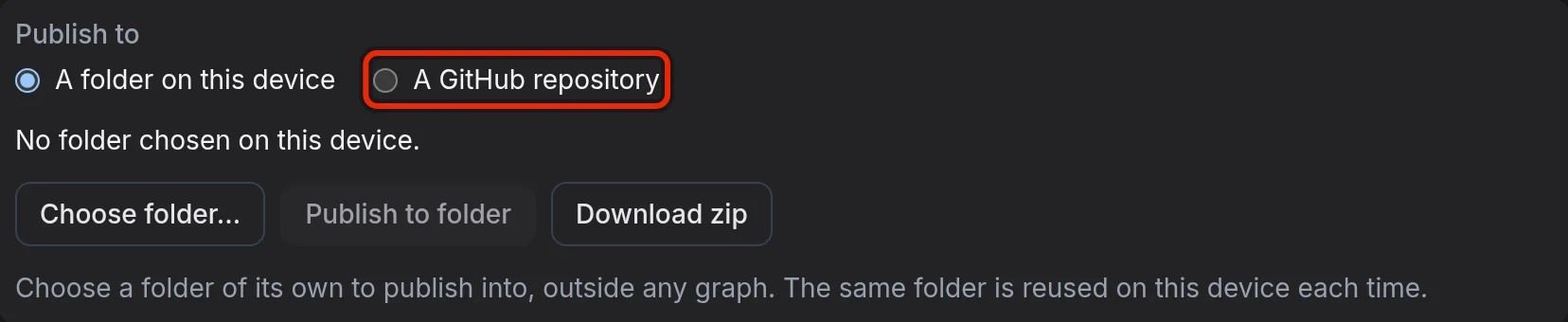
A browser that cannot write to a folder has no Publish to choice and shows the GitHub section and the repository fields directly.
-
In GitHub token, paste the token and select Save token.
-
In Repository, enter the repository as
you/garden-site, or paste its address on GitHub. -
In Branch, enter the branch, or leave it as
main. -
Select Save and check.
-
Select Publish to GitHub.
Save and check saves the repository and branch on this device, and EtherPK checks that the token can read the branch and write to the repository. Publishing never creates a branch, because a mistyped name would put the site where no host looks. If the branch does not exist, create it with the button that appears, such as Create branch gh-pages. The new branch holds only a README.md and shares no history with the other branches.
Publish to GitHub builds the site, commits it as one commit and shows a View the commit on GitHub link. If nothing has changed since the last publish, it makes no commit.
The first time you publish a site to a branch, EtherPK lists the files already there that it would replace or delete, and commits nothing until you agree. It does not ask about a README.md already on the branch or about files outside the places a publish writes, and it leaves them as they are. From then on, AGENTS.md on the branch names the publication, so later publishes of the same site do not ask again.
The repository keeps every commit, so files that a publish replaced and pages you later withdraw from the site stay in its history. If the repository is public, anyone can read them there.
The Headless Client can also publish to the repository. See The Headless Client for more information.
Cloudflare
On Cloudflare, the site runs as a Worker with static assets, set up by the wrangler.jsonc file in the folder.
To deploy from your computer, install Node.js and run Wrangler in the folder:
cd ~/Sites/garden
npx wrangler login       # once - opens the browser
npx wrangler deploy
After each publish, run npx wrangler deploy again.
Cloudflare can also deploy each push to a GitHub or GitLab repository, including one that EtherPK commits to:
- In the Cloudflare dashboard, go to Workers & Pages and select Create application.
- Choose GitHub or GitLab and pick the repository.
- Leave the build command empty, and keep
npx wrangler deployas the deploy command.
Your own domain must be an active zone in your Cloudflare account. To add it:
- In Workers & Pages, open the Worker and go to Settings > Domains & Routes.
- Select Add, then Custom Domain.
- Enter the domain and select Add Custom Domain. Cloudflare creates the DNS record for you.
Netlify
If the folder is not in git, drag it onto Netlify Drop, which publishes the files as they are. To update the site, open it in Netlify and drop the folder onto its Deploys page.
Other hosts
Any static file host can serve the folder unchanged. Set the host to serve index.html as the home page and 404.html for a missing page.
Files in the site folder
| Files | At each publish |
|---|---|
The top-level .html files, search.json, search-index.js, sitemap.xml, feed.xml, .nojekyll, and everything under assets/, theme/, maps/ and pictures/ |
Rewritten, and any other file in these places deleted |
.github/workflows/pages.yaml, wrangler.jsonc, .assetsignore, README.md, .gitignore |
Written only when missing |
AGENTS.md |
Its marked section rewritten, your text around it kept |
| Every other file | Never written or deleted |
The next publish overwrites any hand edits to the files it rewrites and deletes files you add among them, so change your notes in EtherPK instead.
Problems with a hosted site
"The search index could not be loaded."
Site search shows this message when neither search.json nor search-index.js loads. Search reads search.json first and falls back to search-index.js only if that fails, as it does when you open the site from disk. On a host, search needs only search.json at the root of the site. Upload or push the whole folder, which holds both files after every publish.
"GitHub refused the token."
The token is wrong, has expired or has been revoked. Create a new token, then in the GitHub section select Replace token, paste the new token and select Save token.
"A protection rule on "main" refused the commit"
The branch has a protection rule that requires a pull request or a signed commit. Publish the site to its own branch, such as gh-pages, and serve it from there.
"GitHub takes files up to 100 MB"
A file in the site is larger than 100 MB. EtherPK checks the size of every changed file before it sends anything, so nothing was committed. Make the file smaller, or link to it from elsewhere.