Quick Notes
A quick note is a short piece of text you write down without first choosing a page for it. You type quick notes in the Quick notes tab, and they stay there until you delete them or move them into today's journal entry. One button moves the whole list and files each note under the day you wrote it. A quick note is not a document and has no name, so Search, wikilinks and backlinks do not reach it until you move it. If EtherPK is installed on Android or ChromeOS, you can also share text and links to it from other apps.
The list is part of the graph, so it survives a reload and goes wherever the graph goes. In a local graph the list is a file in the graph folder. A synced graph shows the same list on every device you open it on, and in a shared graph each person has their own list. See Synced Graphs and Sharing A Graph for more information.
Open quick notes
The Quick notes tab is the second tab in the left sidebar, next to the tab named after the graph. On a phone, it is the second tab in the left drawer.
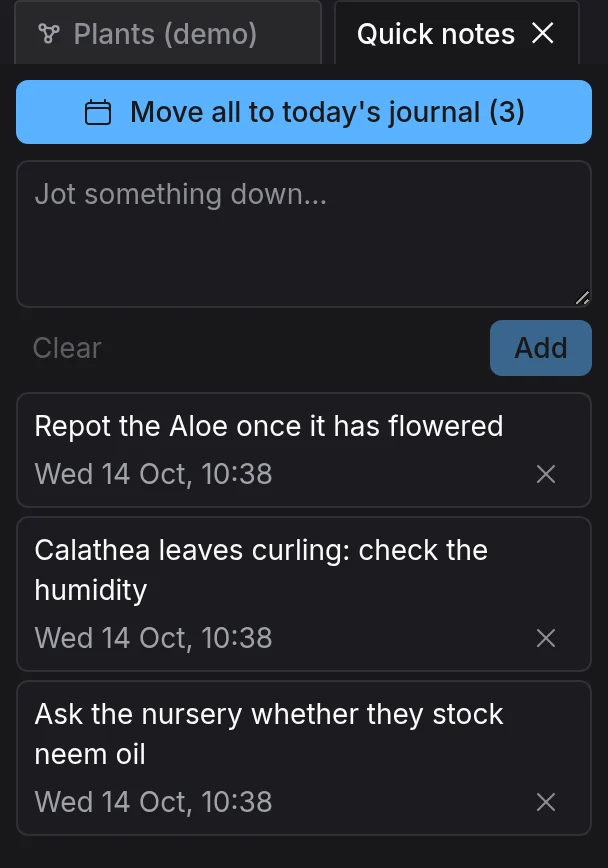
Alt+N brings the tab to the front, reopening it if you closed it, and puts the cursor in its text box. If EtherPK is installed as an app, you can also right-click its icon (or long-press it on Android) and choose New quick note. See Installing EtherPK As An App for more information.
Capture a note
- In the Quick notes tab, type in the text box. For a new line in the same note, press Shift+Enter.
- Press Enter, or select Add.
The note appears at the top of the list, stamped with the day and time you wrote it. To delete a note, select the cross on it. There is no confirmation and no undo.
Text in the box is not a note until you add it, so it survives switching tabs but is lost when you reload the page.
Move the list into the journal
Select Move all to today's journal, above the text box, to move every note into today's journal entry. The app then opens the entry, and the list is empty. You can also run Move quick notes to today's journal from the command menu. See Keyboard Shortcuts for more information.
If today has no entry, the move creates one that holds only the notes and leaves out the journal template. See Templates for more information.
In the entry, each day's notes sit under a bullet that links to that day, and both the days and the notes under each day run oldest first. For example, if the list holds notes from two days and you move it on 2026-09-17, the entry gets these lines:
[2026-09-16]
water the beans
order seed potatoes
[2026-09-17]
mend the shed door
the hinge is loose
See Journal Entries and Outliner Blocks for more information.
The app writes the journal entry before it deletes any notes, so a failed move leaves every note on the list.
Share text from another app
To share text from another app, you need EtherPK installed from Chrome on Android, or installed on ChromeOS. See Installing EtherPK As An App for more information. If EtherPK is not on the share sheet, see Troubleshooting for more information.
- In the other app, open the share sheet and choose EtherPK. The Add to Quick notes page opens with the text in a box, where you can change it.
- If the page lists your graphs, select one.
- To make the note a task, select Add as task.
- Select Add, or press Ctrl+Enter (Cmd+Enter on a Mac).
The page preselects the last graph you opened, so check the choice each time you share. Add as task puts a checkbox in front of the text, so the note becomes a task when you move it into the journal. See Tasks for more information.
For a synced graph, EtherPK saves the note without opening the graph, so you can go straight back to the app you shared from. A local graph opens first, and so does a synced graph that is locked on this device. EtherPK adds the note once the graph is open, and until then the shared text waits in the window: going back or closing the window loses it.
Shared text and links
If you share a web page from a browser, the note becomes a link to the page, with the page title as the link text. You cannot share photos or files, because a quick note has nowhere to keep a file.
Storage, sync and privacy
EtherPK does not show your quick notes to the other members of a shared graph. Every member has the graph key, though, so the notes are not secret from them. Keep private text in a protected document instead. See Protected Documents for more information.
A local graph keeps the list in etherpk/quick-notes.json. Do not edit the file by hand: the app rewrites all of it on every change. See Graph Folder Layout for more information.
Notes still on the list go into a Local Mirror or an export, so a copy taken before a move includes them. See Keeping A Local Copy Of A Synced Graph for more information.