Installing EtherPK As An App
An installed app is EtherPK in its own window, without tabs or an address bar. You start it from an icon in the Start menu, Dock, taskbar, launcher or home screen. It is the same EtherPK at the same address, and your browser runs it. There is no separate download or app store, and nothing to update by hand.
After your first visit with a network connection, your browser keeps a copy of EtherPK, so the installed app can start offline and open the graph you used last. See Working Offline for more information.
You can install EtherPK from the browser menu, or from inside EtherPK with Install app or the Install EtherPK command. Chrome on a computer, Chromebook or Android device has its own install dialog, and so do Edge on a computer and Samsung Internet. In those browsers, Install app and the command open that dialog once it is ready. Safari, Firefox and every browser on an iPhone or iPad install only from their own menus. So in those browsers, Install app and the command open the Install EtherPK dialog instead, with the steps for that browser.
Benefits of an installed app
Which of these benefits you get depends on the device:
- Your browser is less likely to clear EtherPK's data, such as cached documents from synced graphs and passkeys for protected documents. Phones gain the most, because their browsers free up space by clearing website storage but leave an installed app's storage alone.
- Chrome on a computer or Chromebook keeps the access you give a local graph's folder between visits, so you do not have to grant it again every session.
- When EtherPK is installed from Chrome on Android, or on ChromeOS, it appears in the share sheet, so you can share text and links from other apps into Quick Notes.
Before you begin
You can install EtherPK from these browsers:
- Chrome or Edge on Windows, macOS or Linux, or Chrome on a Chromebook
- Chrome, Edge or Samsung Internet on Android
- any browser on an iPhone or iPad
- Safari on a Mac
- Firefox on Windows
- Firefox on Android
An app installed from Chrome on a computer shares its browser storage with your Chrome tabs, so it opens the same graphs with the same settings.
On an iPhone or iPad, install EtherPK before you sign in. The installed app keeps its storage separate from Safari's, so neither a sign-in you made in Safari nor a graph you kept in a Safari tab carries over to it.
Install from EtherPK
If your browser can install EtherPK, you can start the install from any of these places:
- Install app in the header, at computer width, while the browser has its install dialog ready.
- Install app in the header menu on a phone.
- Install app in the account menu, when you are signed in.
- The Install EtherPK command in the command menu, when a graph is open.
You can also start from the Install area at the top of the Settings and Extensions dialog, which you open with the cog button in the toolbar.
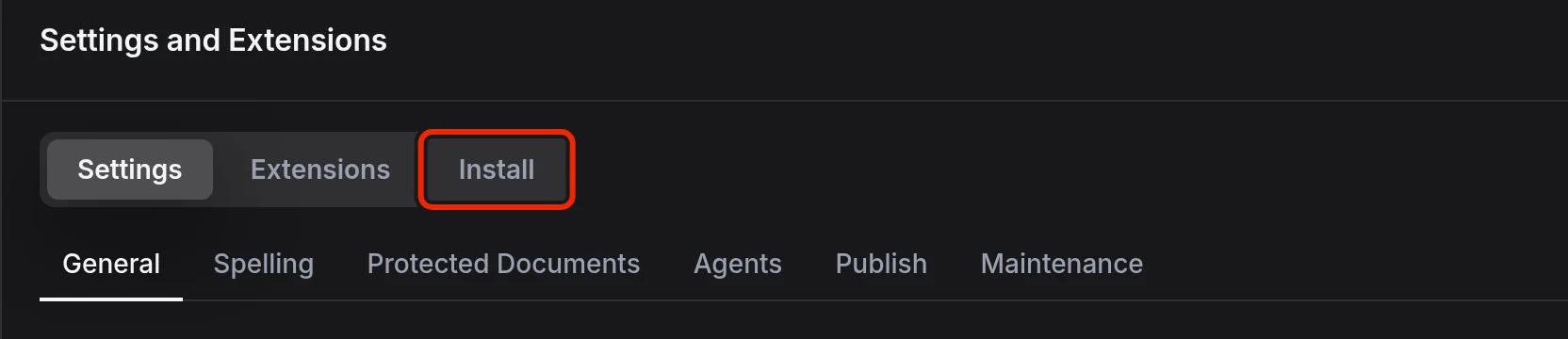
After you accept the install dialog, these options disappear and you open EtherPK from its icon.
Install from the browser menu
Chrome or Edge on a computer or Chromebook
- At the right end of the address bar, select the install icon.
- If the icon is not there, open the browser menu and select Install EtherPK. In Chrome, it is under Cast, save, and share.
Chrome, Edge or Samsung Internet on Android
- Open the browser menu.
- Select Install app or Add to Home screen, then Install.
Edge adds a home screen shortcut that opens EtherPK in Edge.
Any browser on an iPhone or iPad
- Tap Share. In Safari, it is in the toolbar or under More.
- Tap Add to Home Screen. If it is not in the list, scroll down or tap Edit Actions.
- Leave Open as Web App switched on, then tap Add.
Safari on a Mac
- Open the File menu and select Add to Dock.
Firefox on Windows
- At the right end of the address bar, select Add tab to taskbar.
The app opens in a window that still looks like a Firefox window.
Firefox on Android
- Open the browser menu.
- Select Add to Home screen, then Add.
Firefox adds a home screen shortcut that opens EtherPK in Firefox.
Firefox on macOS or Linux
Firefox on macOS or Linux cannot install web apps, and neither can a browser that EtherPK does not recognise. In those browsers, the Install area says so.
Offers to install
You might also see an offer to install EtherPK:
- On the Graphs page on an iPhone or iPad, before you first sign in.
- In the notice that your browser cleared EtherPK data, on the Graphs page or in an open graph.
- When a local graph asks for folder access on a computer.
- In quick notes on Android and ChromeOS.
Each offer appears at most once on a device, and you see no more than one in a session.
App icon shortcuts
Right-click the app icon in Chrome or Edge on a computer, or long-press it in Chrome on Android, then choose a shortcut:
- Today's journal to open today's journal entry
- Search to open Search with the cursor in the search box
- New quick note to open quick notes with the cursor in the note box
A shortcut opens in the graph you used last on this device. There are no icon shortcuts on an iPhone or iPad, or in Firefox.
Updates
When a new version of EtherPK comes out, you get it the next time you move between pages.