Pages And Wikilinks
A page is a document you name yourself, for example after a project, a person or a topic. The other kind of document, a journal entry, is named by its date. To link one note to another, write a wikilink: a name in double square brackets, such as [[Garden]]. A wikilink points at a name, not a file, and opens the page or journal entry with that name.
A name becomes part of the graph as soon as you use it in a link, whether or not it has a page. Search shows the name with its number of references, and the Backlinks panel lists the notes that link to it. While it has no page, the suggestion list that opens when you type [[ marks it Not yet created. When you delete a page, the links to it stay in place and its name goes back to having no page.
A name that has no page opens as a draft: an empty page with the notes that link to the name listed beneath it. To make a new page, open its name and write, since typing in the draft creates the page. Nothing is saved before you type, so you can follow a link, read the notes that mention the name and leave without adding a page.
Case does not matter in a name, so [[Garden]] and [[garden]] open the same page and share its backlinks, though each link keeps the case you typed. Besides its own name, a page can have only the names listed under aliases: in its frontmatter.
Add a link
Type [[ in a note, outside code and frontmatter, to open the suggestion list, and keep typing to narrow it to the names that match. The list marks pages Page, journal entries Journal and names with no page Not yet created. An alias is followed by an arrow and the name of its page. If you have typed a new name, the last row offers it as a New concept.
Press Enter or Tab to complete the link with the highlighted name. The app adds the closing ]] and puts the cursor after it.
A link has a solid underline, or a dashed one when its name has no page.
Open a link
Click a link, or tap it on a touch screen, to open the page or journal entry it names in the same pane.
With the cursor in a link or right beside it, press Alt+Enter (Option+Enter on a Mac) to open the link, and Shift+F10 or the Menu key to open the link menu. On a desktop, Ctrl+Alt+Enter (Cmd+Option+Enter on a Mac) opens the page in the pane to the right, and Ctrl+Alt+Shift+Enter (Cmd+Option+Shift+Enter on a Mac) opens it in the pane below. See Keyboard Shortcuts for more information.
You can also rename a page by editing the name in a link. Once you move the cursor out of the link, the Rename dialog can offer to change every link that uses the old name. See Titles Aliases And Frontmatter for more information.
Link menu
Right-click a link, or long-press it on a touch screen, to open the link menu without following the link.
On a desktop, the first two rows are Open in pane to the right and Open in pane below. A phone shows one pane at a time, so its menu has neither. See Tabs And Panes for more information.
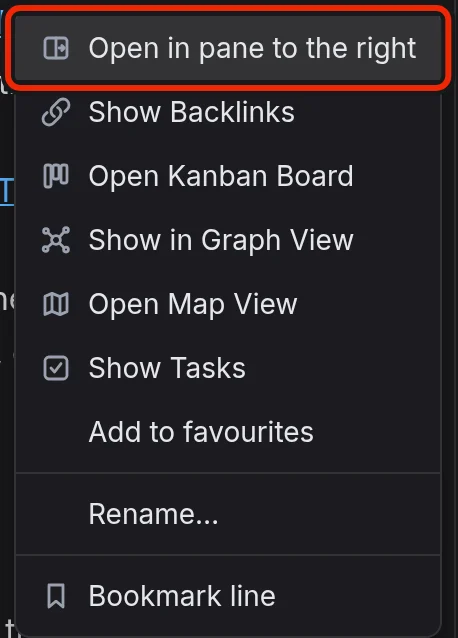
Other rows include:
- Show Backlinks: Show the notes that link to the name in the Backlinks panel.
- Show Tasks: Bring The Tasks View to the front, filtered to the name.
- Add to favourites: Add the page to Favourites in The Graph Sidebar.
- Rename…: Open the rename dialog. A journal entry's name is its date, so a link to one has no such row in its menu.
On a desktop the menu also has Open Kanban Board and Show in Graph View, and on every device it has Open Map View. These rows come from extensions that ship with EtherPK, so switching an extension off on a device removes its row. See Kanban Boards, The Graph View and Maps for more information.
The Bookmarks rows act on the line that holds the link: Bookmark line, or Remove bookmark and Edit label….
Create a page
While a draft is empty, links to its name keep their dashed underline, and Search still lists the name as having no page.
You can also start a page from Search, which shows a + New page row when you search for a name that is not in the graph.
On a local graph, a Markdown file you add to the pages folder also becomes a page. See Local Graphs for more information.
Names
A link shows only the name it points at, so to reach a page by another name, give it an alias. Wikilinks have no [[Garden|label]] or [[Garden#heading]] form.
A link to a date, such as [[2026-09-21]], points at that day's journal entry.
A link inside a link names a scoped page. For example, [[[[Garden]] Beds]] links to Beds within Garden, a different page from [[Beds]]. See Scoped Concepts for more information.
Pages and journal entries
On a local graph, the app saves pages as Markdown files in the pages folder and journal entries in the journals folder. See Journal Entries and Graph Folder Layout for more information.
Delete a page
- Right-click the tab where the page is open.
- Select Delete….
- In the Delete this document? dialog, select Delete.
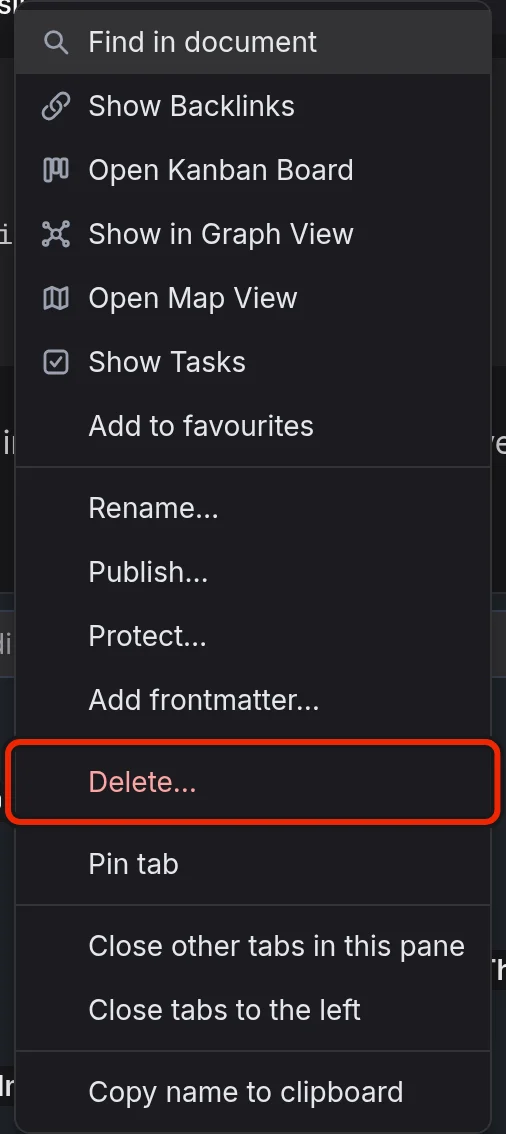
You can also right-click the page in Favourites, Recents or All documents and select Delete… there.
The dialog shows the page's name and how many documents link to it, and warns that you cannot undo the delete. Selecting Delete removes the page and closes its tab. Links to the page stay in place, so they go back to a dashed underline and open a draft. The page also leaves Favourites, whether it was added by its title or by an alias, and its bookmarks are removed. On a shared graph this happens in every member's lists. A favourite Kanban board or map of the page stays, because it works without the page. Images and files the page used remain in the graph until you remove them. See Images And Files for more information.