Titles Aliases And Frontmatter
Frontmatter is a block of settings at the very top of a document, between two lines of three hyphens (---). It holds YAML, one key: value per line, and a key that holds a list has one - item line under it for each item. The app reads some keys, such as title and aliases, and keeps the rest as you wrote them.
---
title: Kanban
aliases:
  - Board
  - Kanban wall
---
- the document starts here
The block counts as frontmatter only when it starts the document and has its closing --- line. Anywhere further down, a line of three hyphens is a horizontal rule. The editor shows the block as a shaded panel with dimmed --- lines, and you type into it like any other text. Inside the block, a - line is a list item under a key, not an outliner bullet.
title is the page's name: the one you use in links and see on its tab. A journal entry takes its name from its date, so you cannot rename it. A title key on a journal entry changes nothing, and the editor marks it in amber. aliases lists other names for the page, and a link, a Search result or an address that uses any of them opens the page.
Name changes in the block take effect when you leave it, by moving the cursor out, clicking elsewhere or closing the document. They never apply while you type, so a half-typed title does not open a dialog. Once you leave, a changed title opens the Rename dialog and changed aliases apply without one.
When you rename a page, the Rename dialog shows how many documents link to the old name and lets you choose what happens to those links:
- Update the links, the default, rewrites the links to the new name, and the old name no longer leads to the page. Use it when the old name was wrong. It never rewrites links in protected documents, so those links stop opening the page.
- Keep the old name working turns the old name into an alias and leaves the links as written, so they still open the page and your notes keep their wording.
On a local graph, each page keeps its title and aliases in its own file. The title names the page whatever the file is called, so renaming the file in another program does not rename the page. A page without a title takes its name from its file.
On a synced graph, the graph itself holds page names and aliases, and the block shows them. Editing the block asks for a change, and the page keeps its old name until that change is applied.
You cannot undo a rename, so to fix a wrong name, rename the page back. If the new name is already taken, the rename merges the two pages and they stay joined.
Frontmatter keys
Besides title and aliases, the app reads these keys:
| Key | What it does |
|---|---|
public |
Makes the document publishable when true. |
publications |
Lists the publications the document belongs to, by id. |
publication |
Makes the page a publication's settings page, which is never published. |
slug |
Sets the page's address on the published site. |
date |
Sets a blog post's date, as YYYY-MM-DD. |
template |
Makes the page a template when true. |
Other keys have no effect in the app, but you can filter Search by any key and its value, such as status:draft. See Publish Settings for more information on the publishing keys, and Templates for template pages.
Rename a page
-
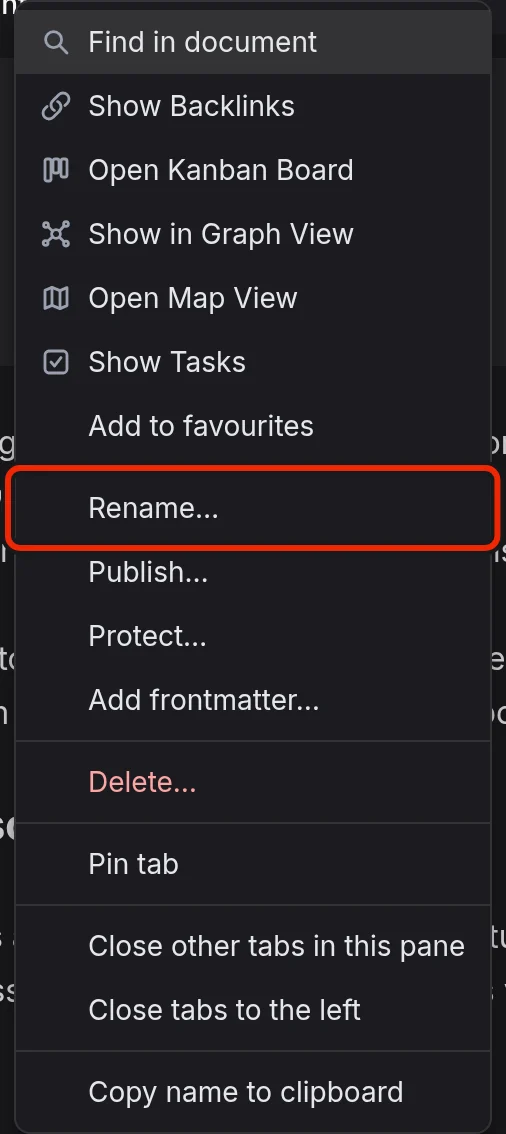
Right-click the document tab and select Rename….
-
In New name, enter the new name.
-
Select Update the links or Keep the old name working.
-
Select Rename.
You can also right-click the page in Favourites, Recents or All documents, or a link to it, and select Rename….
To rename from the block, edit the title line and leave the block. The Rename dialog opens without a name field, with a message that you changed the title in the frontmatter. Select Cancel to put the old title back without renaming anything.
Renaming a page also renames the pages that use its name as a scope, such as Garden in [[Garden]] Tools. See Scoped Concepts for more information.
Rename from a link
You can rename a page by editing its name inside a link. To put the cursor inside a link, hold Ctrl (Cmd on a Mac) and click it.
If the old name is still used elsewhere, a dialog asks whether to rename the page when you move the cursor out of the link. Select Rename to change the name everywhere, or Just this link to change only the link you edited. If nothing else uses the old name, no dialog opens and the link points at the new name.
If a replace in Find And Replace changes the name in a link, Find and Replace asks about the rename in its own Replace and rename dialog before it changes any text.
Taken and refused names
If another page already has the new name as its title or an alias, the rename merges the two pages. The merge joins their bodies and discards nothing from them, but the page you renamed loses its other keys, and the page that already had the name keeps its title. The dialog warns you about the merge before you confirm.
The app refuses these renames:
- A rename that would merge a protected document with another page, because a protected document never merges.
- A calendar day as the new name, because each date names a journal entry.
When you rename from a menu or a link, the dialog shows the reason before you confirm. If you typed the name into the title line of the block, no dialog opens. A notice says "Could not rename:" followed by the reason, and the old title goes back into the block.
Give a page other names
Add an aliases: line to the block, with one - Name line under it for each alias.
Because the page takes its aliases from the block, removing the aliases: line or deleting the whole block clears them. If you delete the block by mistake, press Ctrl+Z to bring it back, and on a synced graph, then select Apply aliases in the note on the block.
Add frontmatter
- Right-click the document tab, or its row in Favourites, Recents or All documents.
- Select Add frontmatter….
- Tick the keys to add.
- Select Add.
The app adds the keys to the block at the top of the document, after any keys already there. It fills in title and aliases with the page's current names and sets public and template to false. The other keys stay empty, and publication gets empty settings. None of these values has any effect until you edit it.
Edit the block
When you leave the block, the editor tidies it into one style without changing what it says, and underlines any line with a problem. A red mark can mean that the app cannot read the block, for example because a line is indented with a tab or a key appears twice. Until you fix it, the app ignores the whole block, so a public: true inside it has no effect. An amber mark means that a key holds a value the app cannot use.
A broken --- line would turn the whole block into ordinary text, so the editor refuses any edit that joins a --- line to the line next to it or removes the closing line. You then see "Frontmatter kept". In a document that is not protected, you can still remove the block: delete the dashes of a --- line, or select the whole block, both --- lines included, and delete it.
See Keyboard Shortcuts for more information on the keys inside the block.
Name differences on a synced graph
On a synced graph, the block only asks for a change, so the block and the page can end up with different names. A note on the first line of the block then says which name the page answers to. Select Rename to “…”… to open the Rename dialog with the name from the block, or Restore to put the page's names back into the block.
When only the aliases differ, the note reads "Aliases here differ from “…”'s". Apply aliases sets the page's aliases to exactly the ones the block lists, so if the block has no aliases: line, it removes them all. Restore writes the page's aliases into the block instead. See Synced Graphs for more information.
Title changes outside EtherPK
On a local graph, when another editor or an agent changes a page's title, the app treats it as a rename that has already happened. You see a notice, and the open tab follows the page to its new name. Links to the old name stay as they are, because the other program rewrote none of them and the app leaves them alone. To point them at the new name, right-click one of those links, select Rename… and enter the new name. See Local Graphs for more information.