Journal Entries
A journal entry is the document for one calendar day. Its name is its date in year-month-day form, such as 2026-09-21, and a graph has at most one entry for each day. Use journal entries for day-to-day writing: tasks, notes and links to pages. When a subject outlasts the day, give it its own page and link to it from the day.
You can open any day, even one with nothing written in it. A day with no entry opens as a draft. Nothing is written until you first type in it, and that first edit creates the entry. So you can browse the calendar or follow a link to a day without creating an entry, and the calendar shows a day in bold only when it has one. See Pages And Wikilinks for more information.
A date in double brackets, such as [[2026-09-21]], is an ordinary wikilink to that day, so it shows up in the day's backlinks like a link to any other page.
Below each entry come its backlinks, then a bar that names the previous day with an entry. Days with no entry are skipped, even when a link points to them. When you scroll down to the bar or select it, that day opens underneath in the same tab, ready to edit. It has its own bar for the next older entry, and so on back in time. The older days you open below an entry make up the journal roll.
The entry for today
To open today's entry, select Today at the top of the Graph Sidebar. On Windows and Linux you can also press Alt+J, but on a Mac Option+J types a character instead. On a phone, tap the calendar icon in the top bar. See EtherPK On A Phone for more information.
The entry opens at the top with the cursor on its first line, even if it was already open and scrolled down. The app checks the date when you open the entry, so you get the new day even if you left EtherPK open overnight.
Reset workspace asks you to confirm, then closes every tab and opens today's entry. That is the same layout you see the first time you open a graph on a device. See Tabs And Panes for more information.
If you have chosen one of your Templates as the Journal Template, today or any later day with no entry opens with the template in it, and stays a draft until your first edit. A past day opens empty.
Other days
To open another day, select it in the calendar in the Graph Sidebar, or type its date in Search. A day you select in the calendar opens at the top, as it does with Today. When you open a day from Search, a link, Recents, Favourites, a backlink or Back, it opens where you were last reading instead. See The Graph Sidebar for more information.
Links to days
You can link to a day from any document. When you filter The Tasks View by a day's name, the view matches each task that links to the day on its own line or is nested under a line that does.
To insert a link without typing the date, type / and choose Today, Yesterday or Tomorrow. Date Picker lets you pick the day from a month grid instead, and inserts the link without opening the day.
Older days below an entry
A bar such as Scroll down for 2026-09-20 loads its day when you select it, press Enter on it, or scroll down while the whole bar is in view. On a touch screen, you can also swipe up. Tab indents the text and never reaches the bar, so to load an older day from the keyboard, type / and choose Show older entry. See Keyboard Shortcuts for more information.
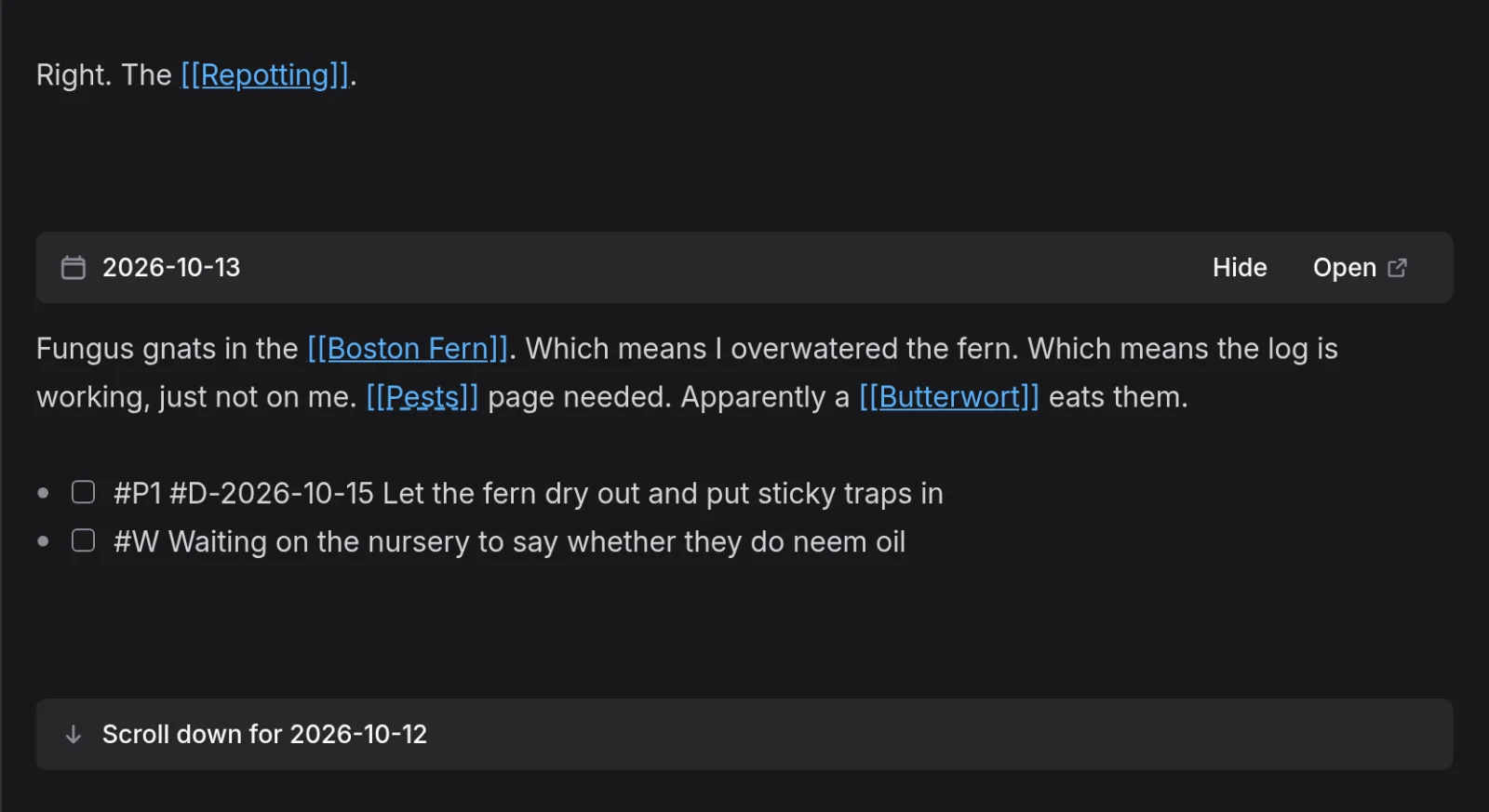
A loaded day is a full editor, so what you type there is saved to that day. While the cursor is in it, the Backlinks panel and the / command menu also act on that day.
On the bar above a loaded day, select Hide to close that day and every older day below it, or Open to open the day in its own tab. The app does not remember which days you loaded, so they close again when you reload, and on a phone when you switch tabs.
Journal entries and pages
A journal entry can hold anything a page can, such as tasks, images and tables. An entry's name is its date and a day has at most one entry, so you cannot rename an entry or give a page a date as its name. Rename… is not offered for an entry, and a title key in an entry's frontmatter shows a warning and changes nothing. The aliases, public, publications and slug keys work as they do on a page. See Titles Aliases And Frontmatter for more information.
In a local graph, the entry for 2026-09-21 is the file journals/2026-09-21.md. See Graph Folder Layout for more information.
You cannot protect a journal entry, so keep sensitive text in one of your Protected Documents and link to it from the day.
Journal entries in other features
You can move your Quick Notes into the entry for today with Move quick notes to today's journal. An agent connected through The Headless Client can read days and add text to them, and it creates the entry when a day has none. Daily notes you import from Logseq, Obsidian or AS Notes become journal entries. An entry created in any of these ways gets only that text and not the Journal Template. See Importing A Knowledge Base for more information.
A published site can include journal entries and lists them on a Journal page in the site menu. See Publishing Your Notes As A Website for more information.
Extensions can add a panel about the day between the entry's text and its backlinks. The panel is not part of the entry, so nothing in it is synced, searched, exported or published.